SUNBED RESERVATIONS FOR HOTELS & RESORTS

A place in the sun.
Without the towel race.

Give guests a fair, simple way to reserve a sunbed. Give your team live availability and the rules to keep the pool day running smoothly.

3 months free · Setup included · No credit card · No obligation
A turquoise resort pool with sun loungers and shaded parasolsMore time to relax.

For guests

ScanNo rushReserveOne tapEnjoySpot on
No rush, one tap, spot on — the whole guest journey in three steps.

For hotels

Browser-based, no app to installLive availabilityNo PMS integration requiredYour map, zones, and rules
01 / THE GUEST EXPERIENCE

A familiar way to book.
A calmer way to relax.

Guests open TowelsOn in their phone browser through a QR code or shared booking link. Room-level access controls and a manual room-code fallback keep access straightforward.

01

Get in with a QR or room code

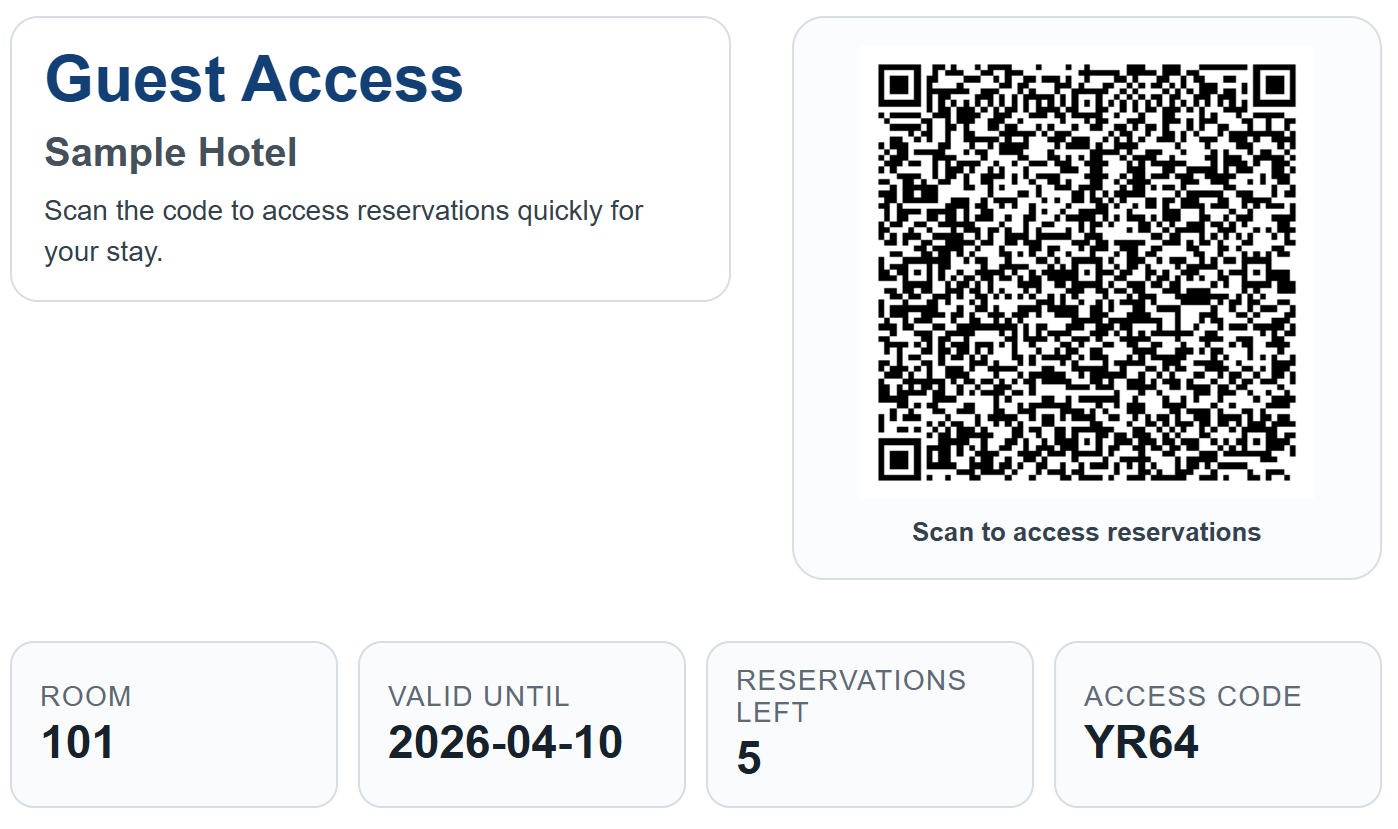
At check-in the guest gets a slip with a QR code, their room number and a short access code. Scanning it opens the hotel’s own page in the browser they already have. No app, no account, no password. If they lose the slip, reception reads out the room code instead.

02

See what’s available

Check the live view before walking to the deck. See which sunbeds and time slots are open.

03

Reserve a time slot

Choose a sunbed and a time within the hotel’s booking windows and reservation limits.

04

Find your sunbed

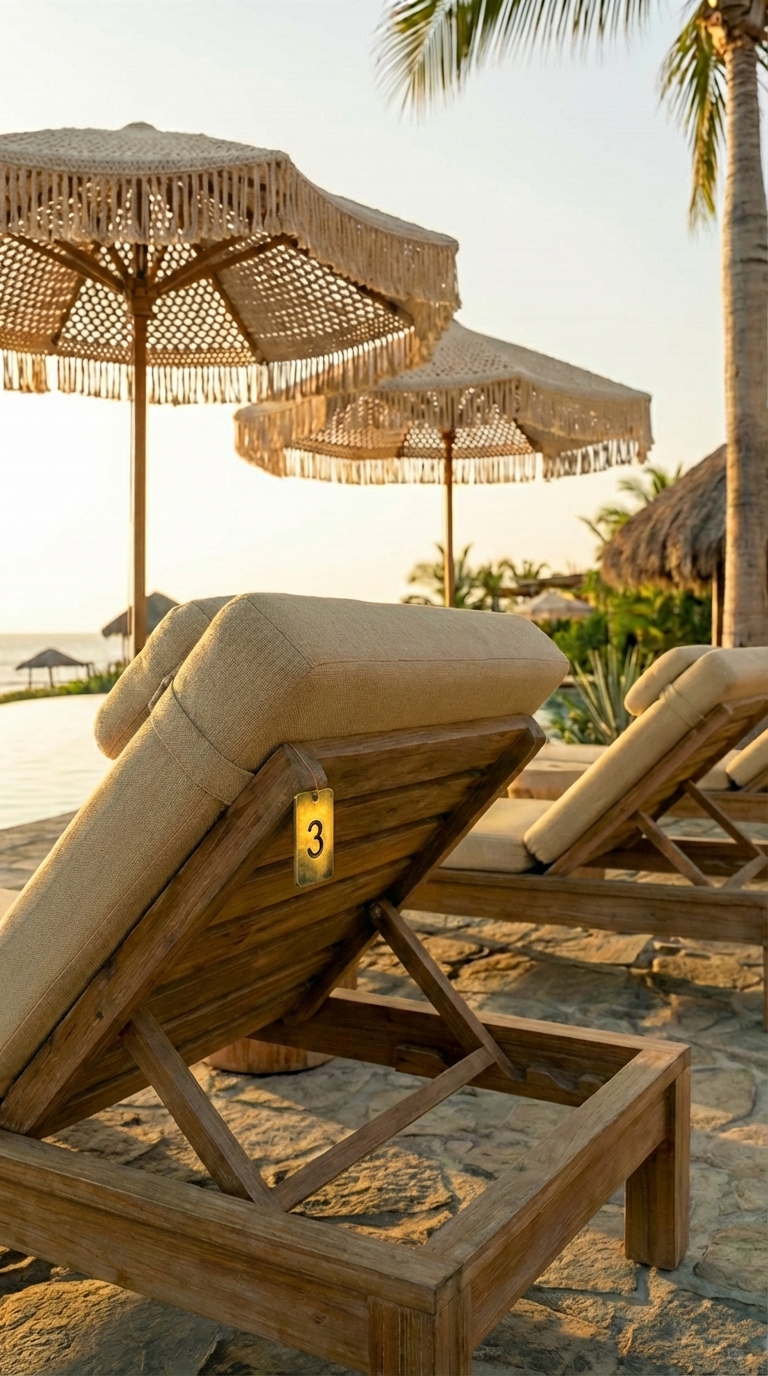
A wooden sunbed beside the pool with a small numbered tag reading 3 on its frame, alongside matching loungers and fringed parasols

Match the map label with the sunbed number on-site. Settle in with clear expectations.

Guest access and the complete booking flow

Reception shares QR access at check-in, so every guest receives it the same way whether they booked on your own site, through an agent or through a travel platform. Guests scan once to open reservations, with room-level controls behind the QR code. A room code is available as a manual fallback, and a shared tablet can support guests without a smartphone. No guest account or app download is required, and nothing in the flow depends on the booking channel or on a PMS connection.

Guests check live availability, choose a sunbed and time slot, then find the sunbed using the map label and on-site numbering.

Original TowelsOn guest check-in QR access example

“It works just like reserving theater tickets online — everyone already knows how to do that.” — Jussi Tuulisaari, founder of TowelsOn

02 / HOTEL CONTROLS

Your pool.
Your operating rules.

Control what can be booked, when it can be booked, and who can book it. Your staff can manage reservations and exceptions from a PC, tablet, or phone.

01

Zones & real-world layout

Configure the main pool, beach, quiet deck, or adults-only zone. Place sunbeds on your real map and define types, rows, descriptions, and numbering. Availability follows the selected zone.

02

Time slots & booking windows

Set operating hours, the timezone, available dates, and time slots. Decide how far ahead guests can reserve and when booking opens or closes. Adjust the parameters as your operation changes.

03

Room access & simple limits

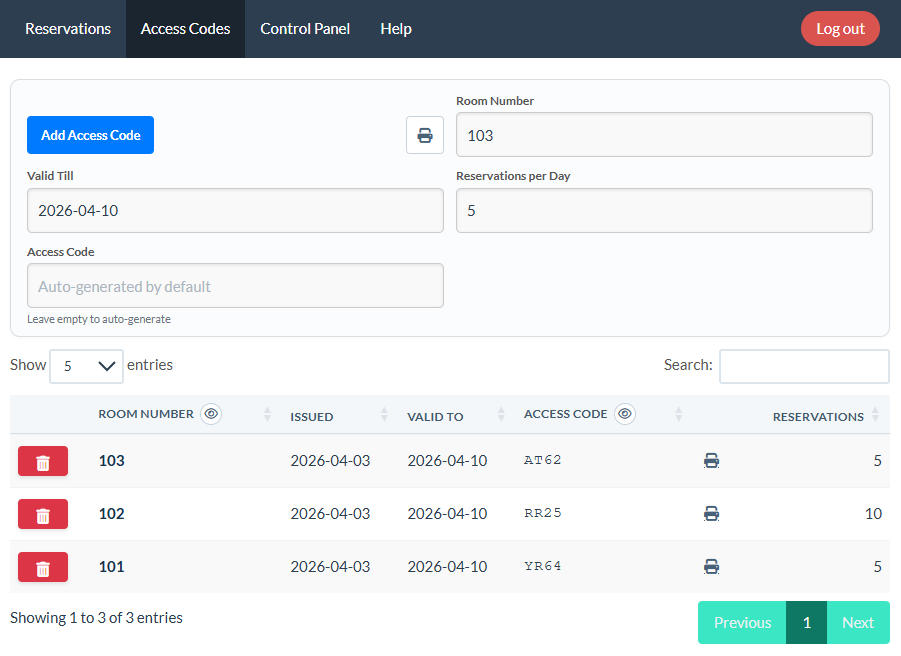
Issue room-based codes, set how long they stay valid, and limit reservations per room. Duplicate-booking validation is automatic. Reception can print a guest handout from the access-code screen.

04

Live overrides & exceptions

See reservations across zones and update availability in real time. Handle VIP needs, maintenance, weather closures, and group bookings under your defined rules.

05

Paid beds & premium zones

Decide which loungers, cabanas or zones carry a charge, and what they cost by lounger and time slot. Free guest reservations carry on alongside them.

06

Beyond the main pool

The same rules run beach zones, adults-only decks and other reservable areas — one compact pool or a resort with several zones.

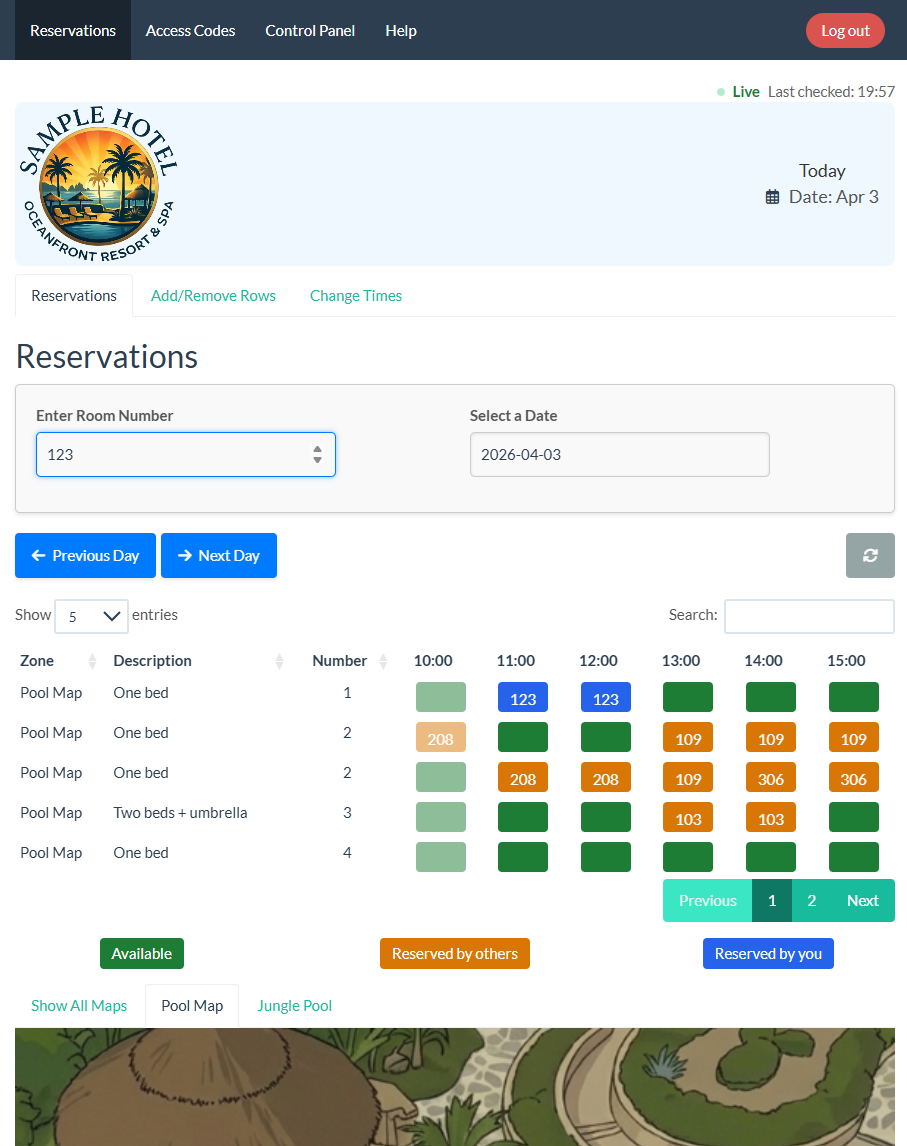
Actual TowelsOn live operations dashboard
Live operations · Actual TowelsOn interface
The TowelsOn access-codes screen: rooms with their issue and expiry dates, generated codes, a print action, and a reservations-per-day allowance
Access codesRoom access, limits, and printable check-in handouts.
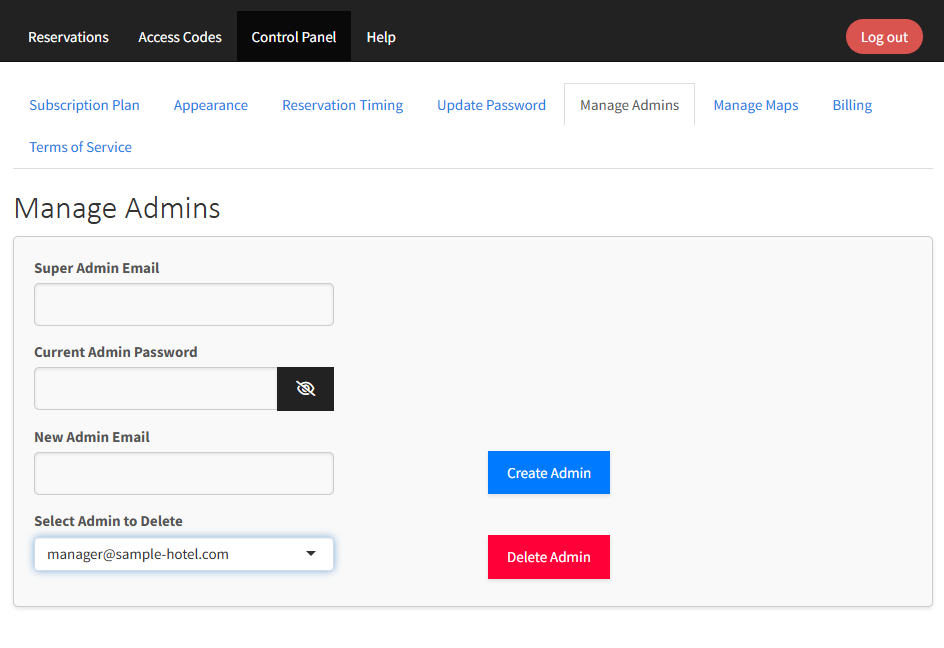
Actual TowelsOn administrator control panel
Control panelAdministrator access, reservation timing, and layout settings.
03 / FEATURES

What else it
covers.

What the product covers beyond the pool-day basics — starting with the languages your guests and your team actually read.

Seven languages, guests and staff

Guest screens, staff screens and the in-app help are translated — not just the guest side: English, Español, Português (Portugal), Português (Brasil), Italiano, Suomi and עברית. Each hotel chooses which languages its guests can pick from, and a QR link can open straight into one.

Amenity types and property use cases

Use the same map and time-slot logic for main pools, beach zones, adults-only decks, and other individually reservable amenity areas. Layouts can cover compact hotel pools or larger resorts with multiple zones.

Optional paid booking flows support premium loungers, cabanas, and paid zones, priced separately from free guest reservations. Amounts are set per lounger and time slot, and can be adjusted as demand changes.

04 / SETUP & GUIDED PILOT

Start with your layout.
We’ll help you launch.

No PMS integration is required for the core workflow. With the layout and kickoff details confirmed, the first working setup is typically ready in 1–2 days.

WHAT YOU SHARE
  • A layout image, floor plan, or suitable photo
  • Approximate lounger count and preferred timing
  • Your zones, access rules, and optional hotel logo
WHAT TOWELSON PREPARES
  • Your digital map, numbering, rows, and zones
  • Booking rules, hours, and timezone
  • QR signage, guest materials, and staff education
YOUR FIRST THREE MONTHS

€0. A full setup.
A supported start.

Customized setup and staff education are included, with priority support during the pilot. Learn the basic workflow in one day. Continue on a published plan or stop with no obligation.

No credit card. No obligation to continue.

Founding pilot: AVK · Started May 2026. A club environment for validating shared amenity reservations, QR access, booking rules, and staff overrides.

Layout, numbering, and configuration details

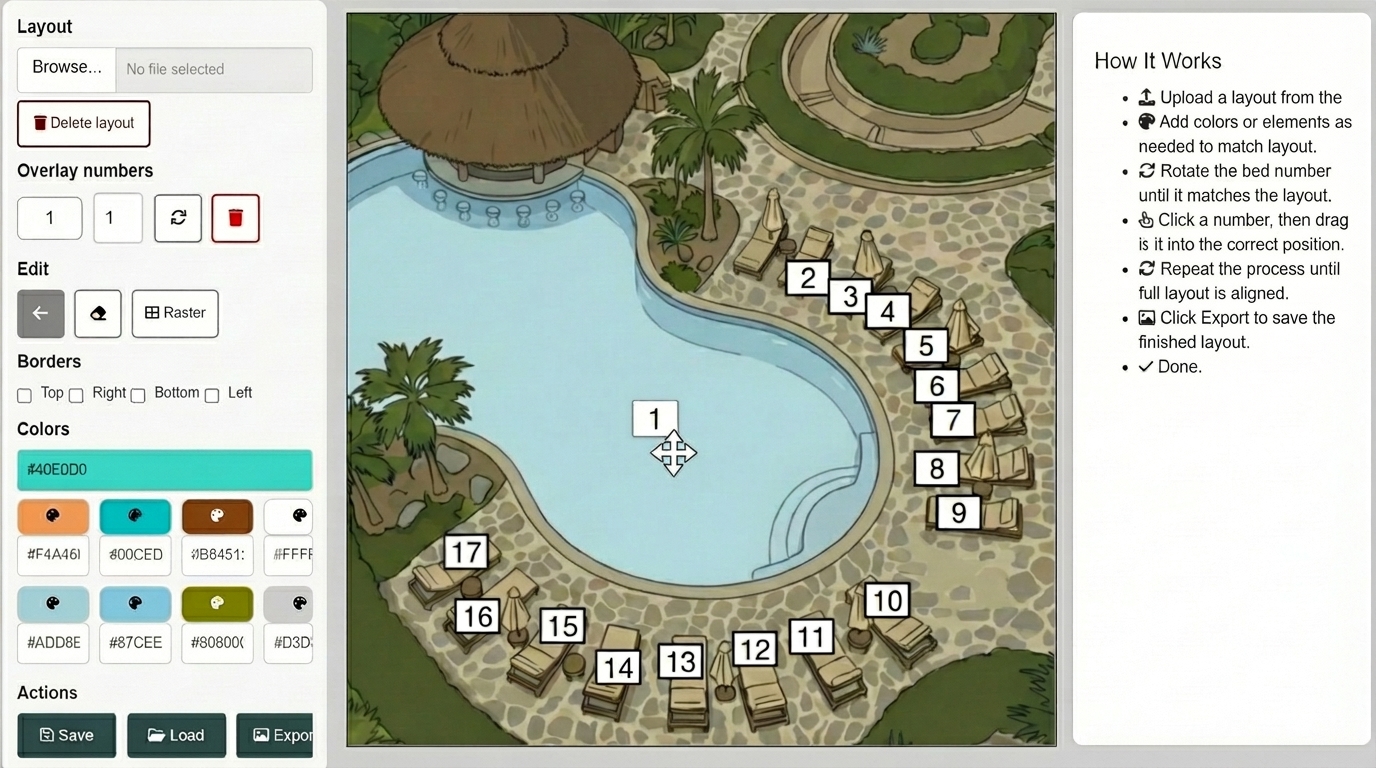
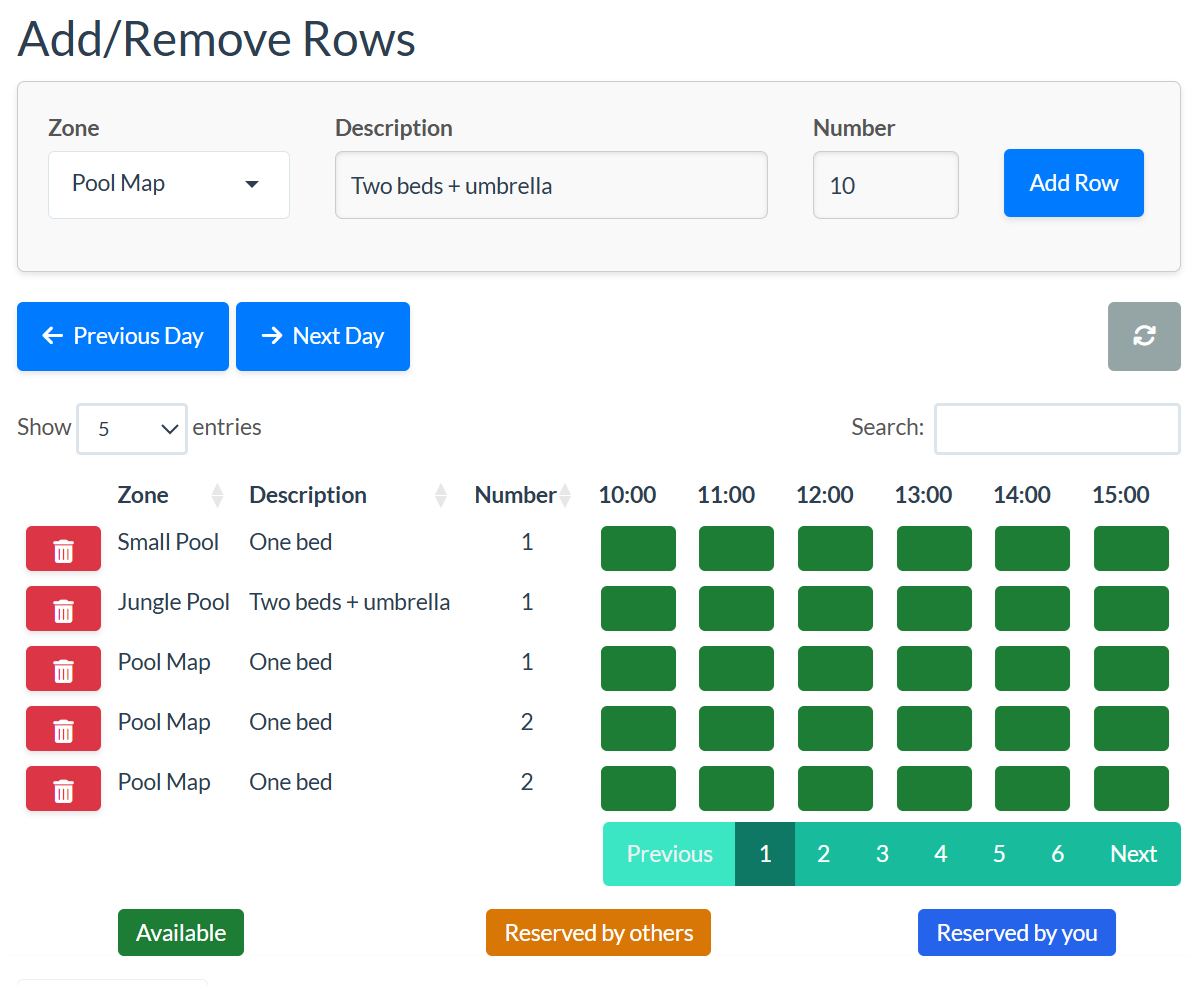
You can start without any numbering and add it later. TowelsOn places the sunbed numbers over the real-world map, defines sunbeds, rows, zones and descriptions, then sets reservation parameters such as operating hours and the timezone. The hotel can adjust or redo any of these steps in the system.

Actual TowelsOn map layout and bed-number placement screen
Place sunbed numbers on the real layout.
Actual TowelsOn reservation structure and row configuration screen
Define rows and reservation parameters.

For a guided pilot, share your approximate lounger count, preferred timing, and any zone or access rules. Jussi reviews the request and replies with the next step, then a short kickoff confirms the setup and timeline. TowelsOn prepares launch materials and staff education. The pilot is free for three months, with no obligation to continue.

05 / TRANSPARENT PRICING

A plan for your property.
And its season.

No per-user fees. Every plan includes live availability, time slots, browser access, and core hotel controls.

PlanReservable amenitiesMonthly priceWhat’s included
BoutiqueUp to 20€79Interactive layout tool, unlimited staff and guest access, email support
Resort51+€349Everything in Classic, priority support, multi-zone layout
ChainMultiple propertiesCustomEverything in Resort, dedicated group environment; customizations and premium support on request
Flex / Low-Season ReliefNo amenity or reservation limits€19 + €0.20per reservationThe plan paid beds run on — billed per reservation. Also suits lighter or seasonal demand; your setup and data stay active
COMPARE MONTHLY COSTS

What fits your usage?

Estimate the lowest cost between your amenity tier and Flex.

Request a switch, upgrade, downgrade, or move to Flex at any time; the new plan takes effect from the next month. Paid reservation flows are optional. Calculator compares core plan prices; optional add-ons are excluded.

06 / DIRECT BOOKINGS

A perk an agent
cannot resell.

Your own booking page already promises the best rate. A reserved sunbed is something a booking platform cannot put in its inventory, because it does not run your deck.

01

Open the window earlier for direct bookers

Booking windows are already part of the setup. Let guests who booked with you directly open the next day’s slots before everyone else. That is a dated, concrete benefit you can name on your own booking page, beside the rate promise you already make there.

02

Every guest still gets in

Access is issued at check-in against the room, never against the booking channel. Guests who arrived through an agent or a travel platform reserve sunbeds exactly like anyone else; they simply do not get the earlier window. Nothing is withheld at the deck, because an argument at the pool gate is the thing this product exists to remove.

How the earlier window works in practice

Reception already knows how each arrival booked, so the slip it hands over at check-in decides which booking window applies. That keeps the main flow exactly as described elsewhere on this page: no PMS integration, no channel manager feed, no guest account.

The advantage is an amenity rather than a discount. Distribution contracts generally govern the room rate you publish, not what you offer a guest once they arrive, which is why an earlier sunbed window sits beside a rate promise rather than inside it. Your own agreements are the ones that decide, so read them before you advertise it.

It also stays honest about what software can do. An earlier window changes who books first; it does not create more sunbeds. Hotels running short of capacity at peak should set the windows and reservation limits first, and treat the direct-booking advantage as a reason to book with you rather than as a way to sell the same lounger twice.

BEFORE YOU GET STARTED

A few practical
questions.

For hotels, resorts, beach clubs, and other properties managing shared amenities.

Can guests book a sunbed from our own website before they arrive?

Yes. Your own website can offer direct sunbed pre-booking, so guests book from your page before they arrive. The pre-booking link sits inside your own booking flow — on your booking page or in your confirmation email — and is tied to the reservation you have just taken. That is why a travel platform cannot match it: it does not sell your deck and never sees that reservation on your side. From check-in the room QR takes over as usual, and guests who arrived through an agent reserve exactly like everyone else once they are on the property. Keeping pre-arrival booking for direct bookings is a policy you set, not a limit of the software.

What if someone is already on the sunbed I reserved?

Everybody can see the same reservation, and that is what settles it. The guest opens their booking on their phone, staff can see which room holds the slot, and there is nothing left to take anyone’s word for — much as a theatre ticket makes arguments over a seat rare. Software cannot physically move a towel, but once the claim is plainly visible to both sides, almost every argument ends before it begins.

Do guests need an app or an account?

No. Any device with a web browser works — there is no app to install, no account to create and no minimum phone. Guests scan the QR code, or type their room code if scanning is awkward, and a shared tablet at the desk works just as well.

Will guests understand the booking flow?

The flow follows familiar online booking: see availability, choose a place and time, and confirm. It uses the same pattern as cinema tickets, restaurant tables, and appointments.

Do we need PMS integration or an IT project?

No PMS integration is required for the core reservation workflow. TowelsOn prepares the map, rules, and QR materials and helps staff learn the basics.

Can the hotel change the setup later?

Yes. Staff can adjust the layout, zones, reservation parameters, and access rules within the system. Live overrides handle day-to-day exceptions.

What happens after the free pilot?

After three months, continue on a published plan or stop without obligation. A switch can be requested at any time and takes effect from the next month, including moving to Flex / Low-Season Relief.

07 / LET’S TALK

A clearer pool day
starts here.

Tell us about your property, request a demo, or ask about your first pilot.

Jussi, founder of TowelsOn

Jussi reviews requests personally.
Clear next steps within 24 hours.

info@towelson.comSales, questions & supportpartners@towelson.comPartnerships
One form for all three. Jussi reads them himself and replies by email with the next step for your property.
GO DEEPER

The full walkthrough

The brand film: the 6am towel race, a QR card handed over at check-in, and a lounger booked from the balcony. 1 minute 17 seconds, with sound. Served from this site — nothing loads from YouTube.
What the film shows

Dawn at an empty pool: a guest hurries down to the deck and drapes a towel over a lounger while the rest of the hotel sleeps. The scene cuts to a reception desk, where a receptionist hands a printed card across the counter. On a balcony at sunset the same card lies on the table, its QR code facing up, as the guest picks up her phone, opens the hotel’s booking page and reserves a lounger and a time slot for the next morning. The film closes on the pool at first light with the reserved lounger waiting and no towels on the others.